
Buy Arena Breakout: Infinite Coins
Arena Breakout: InfiniteBuy Arena Breakout: Infinite Coins
 844.1K Sold
 Ships within 3 minutes
 Secure844.1KSoldShips within 3 minutes
Order Information
In order to complete the transaction, please fill in the correct email.
Select Payment
Lombuy Arena Breakout PC Koen Top Up – Safe, Secure, & Instant Delivery!
What Information You Need For Arena Breakout Infinite Bonds Top Up
Before you purchase Arena Breakout Infinite Bonds, you'll need a few details from your account for the transaction:
- Arena Breakout: Infinite Account UID: Arena Breakout: Infinite account User ID (UID) is a unique string of characters/numbers.
- Applicable Platforms: If you buy Bonds for ABI PC version, they will only be accessible on the PC version of the game (Arena Breakout Infinite). The game does not support cross-platform/cross-progression features, meaning Bonds are isolated only to the PC version of the game.
- Important Note: To top up the Arena Breakout Mobile version, click the hyperlink.
How to Find Your Arena Breakout: Infinite UID
Here's a quick guide to find your UID needed to buy Arena Breakout PC version Bonds on Lombuy:
Step 1: Launch Arena Breakout: Infinite on your PC.
Step 2: If prompted, log in to your Level Infinite account.
Step 3: On the Arena Breakout: Infinite launcher's Home Page, click your profile name/avatar. Then select "Account Center".
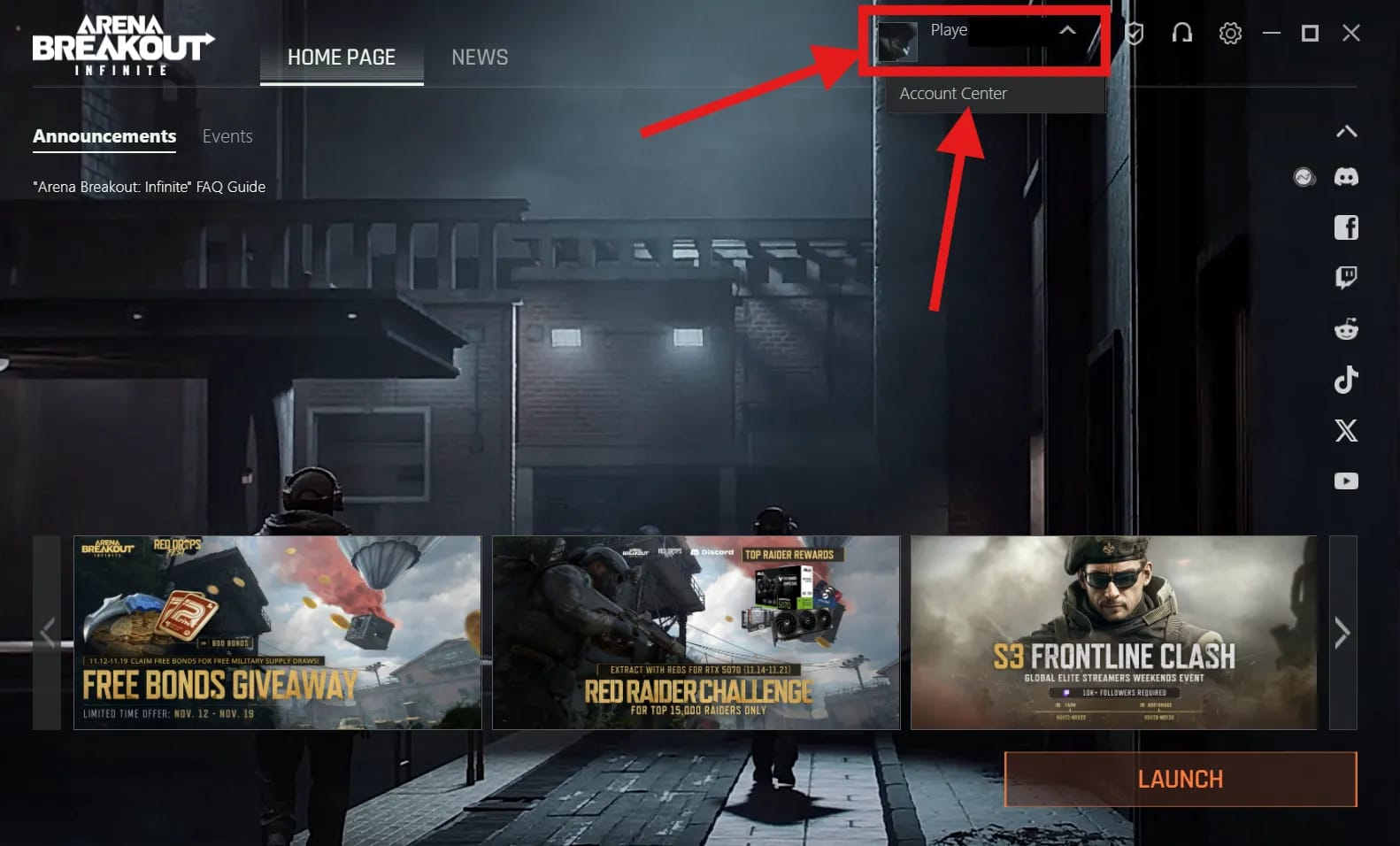
Step 4: In Account Center, you'll see your profile's details. Under the "Open ID" field, you'll see a string of numbers. This is your Arena Breakout: Infinite UID required for Lombuy top-ups!
How to Top Up Arena Breakout Infinite Bonds
To get an Arena Breakout Infinite top up on Lombuy is convenient, saves you cash, and safe. Here's how to get started:
Step 1: Select the denomination of Bonds you want to purchase.
Step 2: Enter your Arena Breakout: Infinite User ID information.
Step 3: Enter an email address for your Lombuy transaction.
Step 4: Choose your payment method and complete the payment.
Step 5: In just a few minutes, your Bonds will be delivered straight to your account!
Pricing & Discounts With Lombuy!
Getting an Arena Breakout Infinite top up is the quickest way to speed up your account progression. An Arena Breakout Infinite Bonds top up gets your "Bonds", the PC version's premium in-game currency, with which players can unlock premium, high-value ammo & gear bundles, secure character outfits, snazzy new weapon/gear skins, or get a significant bump to storage capacity.
Typically, most of these items you can't earn in-game, and if you can, it's still a significant time sink requiring you to grind for hours on end. But with a ABI bonds top up, things get a whole lot faster, ensuring your loadouts and aesthetics stand out on the battlefield.
Since Bonds can't be earned in-game and are only obtainable through purchase, using a discounted top-up service like Lombuy makes sense if you want to stay competitive without overspending.
Discounted Bonds stretch your budget further, letting you either stockpile Bonds for future updates or get more skins, bundles, and storage expansions for a better value on your hard-earned cash!
About Arena Breakout: Infinite (PC Version)
Arena Breakout: Infinite is the PC version of the critically acclaimed mobile game, Arena Breakout. Arena Breakout: Infinite is a PvPvE FPS tactical extraction shooter from Chinese developers MoreFun Studios.
Arena Breakout: Infinite is available only on PC, while Arena Breakout is available on both iOS & Android.
Can You Earn Bonds in Arena Breakout Infinite?
No, unfortunately, the only way to get Bonds is by purchasing them.
They are a paid-only currency that cannot be earned through gameplay or completing missions. However, the devs do sometimes run events and 'giveaways', where they provide a limited amount of Bonds for free. These events are usually time-gated and don't award a substantial amount of Bonds, but there should be enough for occasional Supply Draws or small storage expansions.
Alternatively, Arena Breakout: Infinite sometimes has Twitch Drops, which typically award in-game items like weapon skins or resources, so check out their socials to stay updated on the latest events/drops!
Does Arena Breakout: Infinite Bonds Transfer to Mobile Version?
No, Arena Breakout: Infinite Bonds do not transfer over to the mobile version, Arena Breakout. At this stage, both games are effectively separate systems, and many of the in-game resources, skins, or rewards cannot be transferred over to one another. But you can check the working Arena Breakout Infinite codes to get freebies.
What is The Best Use for Bonds in Arena Breakout: Infinite?
To get the best value out of your Arena Breakout Infinite top up, here are the most recommended ways players use Bonds:
- Storage Expansion: You're going to be finding a lot of loot in matches, so you can never have enough storage space for everything! This is widely considered the best way to spend Bonds.
- Battlepass: To get more rewards, consider using your Bonds to unlock the latest season's Battlepass. This dishes out plenty of great loot, including weapon skins, Koen, Quick Kits, Secure Cases upgrades, and more!
- Skins & Cosmetics: Another great use for Bonds is to pull for the latest "gacha" in the game, which typically awards Charms, Weapon Skins, and other cosmetic items to deck out your Operator!
- Resource Bundles: These include gear bundles and high-tier ammo (such as T5). Useful in a pinch, but generally not the most cost-efficient option. Most players prefer saving Bonds for skins or seasonal cosmetics.
Lombuy Game Store: Officially guaranteed game top-up platform
Official Top Up Center
We offer direct top-up service from the official distributors to ensure the safety of your transactions without any hidden fees.
Fast
We promise to process your order in real time and deliver the in-game currency or other goods to your account ASAP.
Best Deals
Here you will have the opportunity to purchase games or services at lower prices than retailers.
Customer Support
Product top-ups are non-refundable and non-returnable. Please fill in your user ID carefully, as no refunds or returns can be made after successful payment. If you have any problems during transactions, contact our support team.